Nursing Staffing Matrix Template
Nursing Staffing Matrix PowerPoint Template – Editable Table Layout for Shift-Based Nurse Allocation
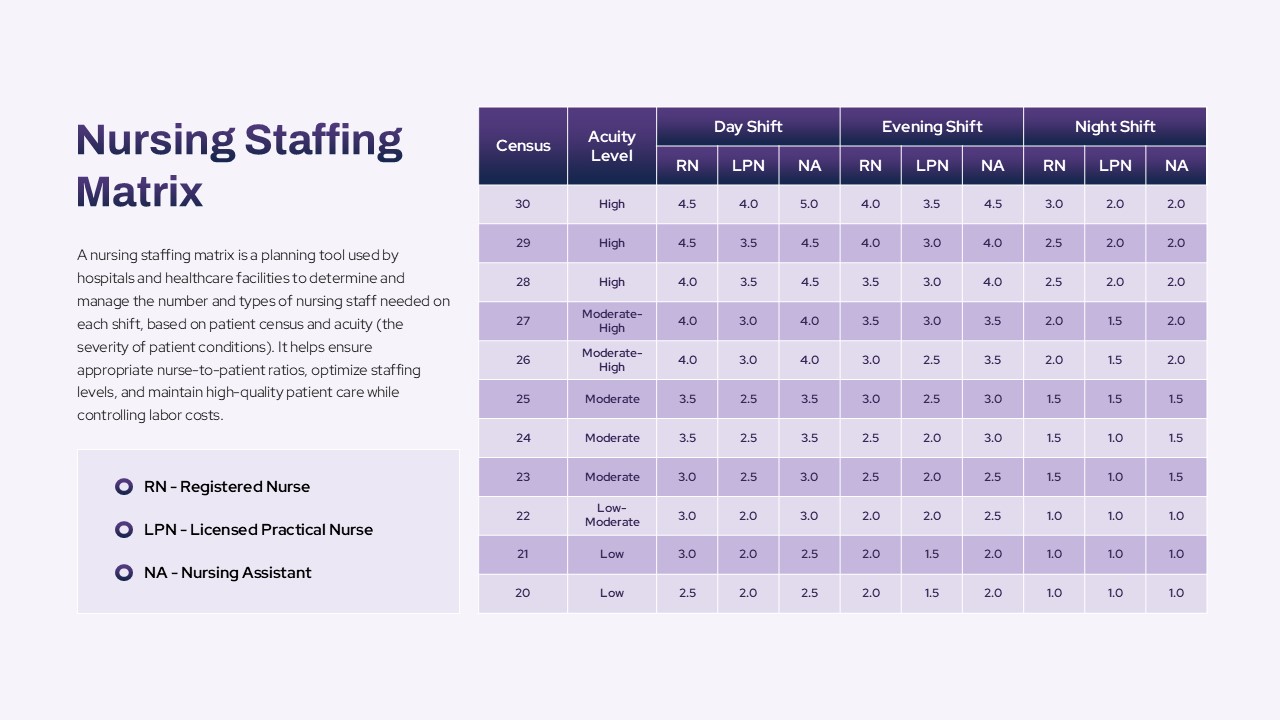
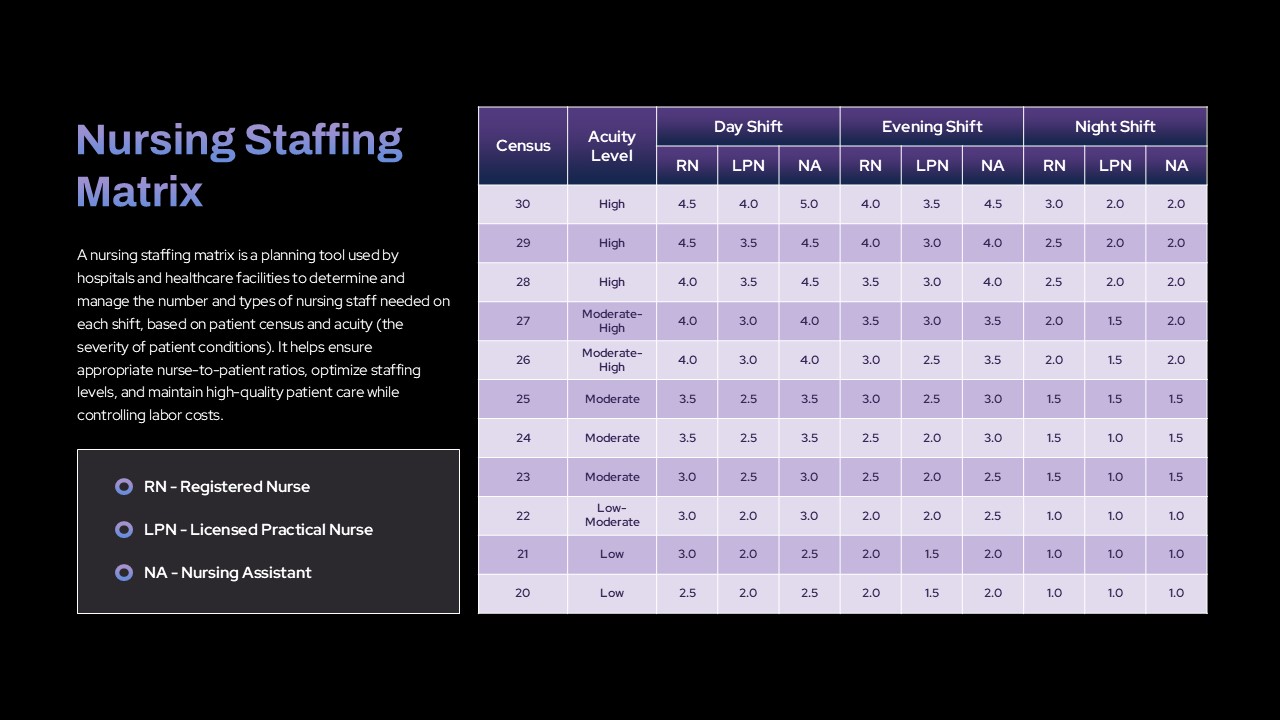
The Nursing Staffing Matrix PowerPoint Template is a professionally designed presentation slide tailored for healthcare administrators, nursing supervisors, and hospital management teams. This nursing staffing matrix ppt template uses a structured table layout that enables users to visualize and manage staffing requirements for various shifts in a clinical or hospital setting. The table prominently features columns for census (patient count), acuity level (severity of patient conditions), and staffing distribution across day, evening, and night shifts.
How to create a matrix table in PowerPoint?
To create a matrix table in PowerPoint, insert a table using the built-in table option and define the desired number of rows and columns. Organize the data by grouping related information in rows and columns. Use formatting tools to adjust colors, borders, and text alignment for clarity and visual appeal. Merging or splitting cells can help represent complex structures. Matrix tables are ideal for comparing data across multiple categories or variables.
Each shift section is further broken down into columns for Registered Nurses (RN), Licensed Practical Nurses (LPN), and Nursing Assistants (NA). This layered design offers a clear snapshot of how many professionals are required based on patient load and care intensity. On the left-hand side of the matrix, there’s a designated space for brief descriptions or shift notes-ideal for mentioning unit type, special patient needs, or staffing guidelines.
The alternating violet and light violet row colors help differentiate each line item visually, reducing confusion and enhancing readability. The nursing staffing matrix table template for PowerPoint is fully editable, allowing users to customize cell values, shift names, color codes, or nurse categories according to their facility’s standards and policies. Fonts, icons, and alignment can also be adjusted to match presentation themes or branding guidelines.
This nursing staffing matrix template is especially useful for:
- Nursing supervisors who need to allocate resources efficiently
- Hospital administrators managing budget vs. care quality
- HR professionals planning shift schedules
- Training coordinators explaining staffing models to new hires
Whether used in meetings, reports, or training sessions, this template simplifies workforce planning and supports informed decision-making. The template empowers users to visually communicate critical information on staff deployment aligned with patient needs-ensuring safety, care quality, and compliance with healthcare regulations.
Login to download this file

Item ID
SB05064Designed By
Krishnapriya


Related Templates

Nursing PowerPoint Template
Nursing

Nursing Process Infographic Template for PowerPoint & Google Slides
Nursing
Nursing PowerPoint Template
Nursing
Nursing PowerPoint Template and Google Slides
Nursing
Free Nursing Capstone PowerPoint Presentation Template
Nursing
Free
Environmental Health Nursing Template
Nursing
Matrix Organization Structure Template
Org Chart
Skills Matrix Template
Project Status
9-Box Matrix for Performance & Potential Template for PowerPoint & Google Slides
Employee Performance
Team Competency Matrix PowerPoint Template
Employee Performance
Speed vs Reversibility Decision Matrix Template for PowerPoint & Google Slides
Comparison
Profitability Matrix PowerPoint Template
Comparison
Competency x Exercise Matrix PowerPoint Template
Project Management
Risk Probability & Impact Matrix Template for PowerPoint
Risk Management
Decision Matrix PowerPoint Template
Leadership
Buyer Utility Map Strategy Matrix Template for PowerPoint & Google Slides
Customer Journey
Action Priority Matrix Template
Business Strategy
Product Process Matrix Diagram Template
Business Strategy
Performance vs Potential Matrix PowerPoint Template
Employee Performance
Requirements Traceability Matrix Template PowerPoint
Software Development