



























Emergency Operations Plan PowerPoint Template
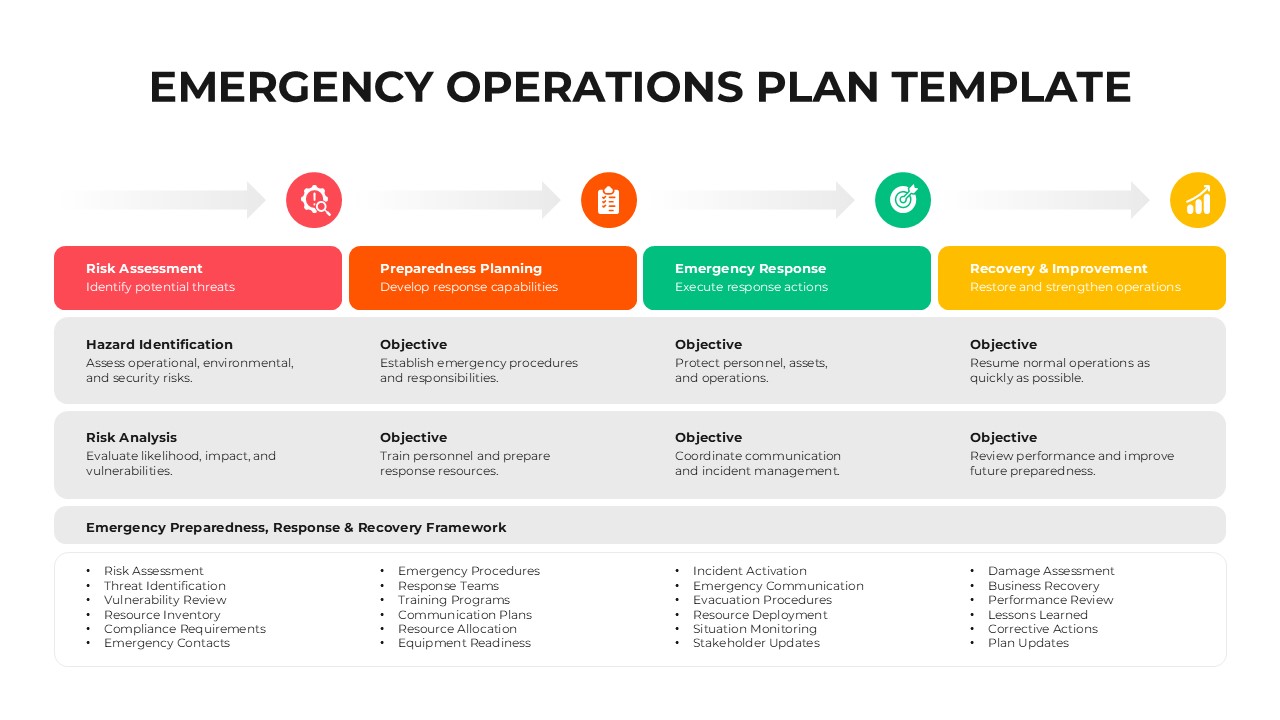
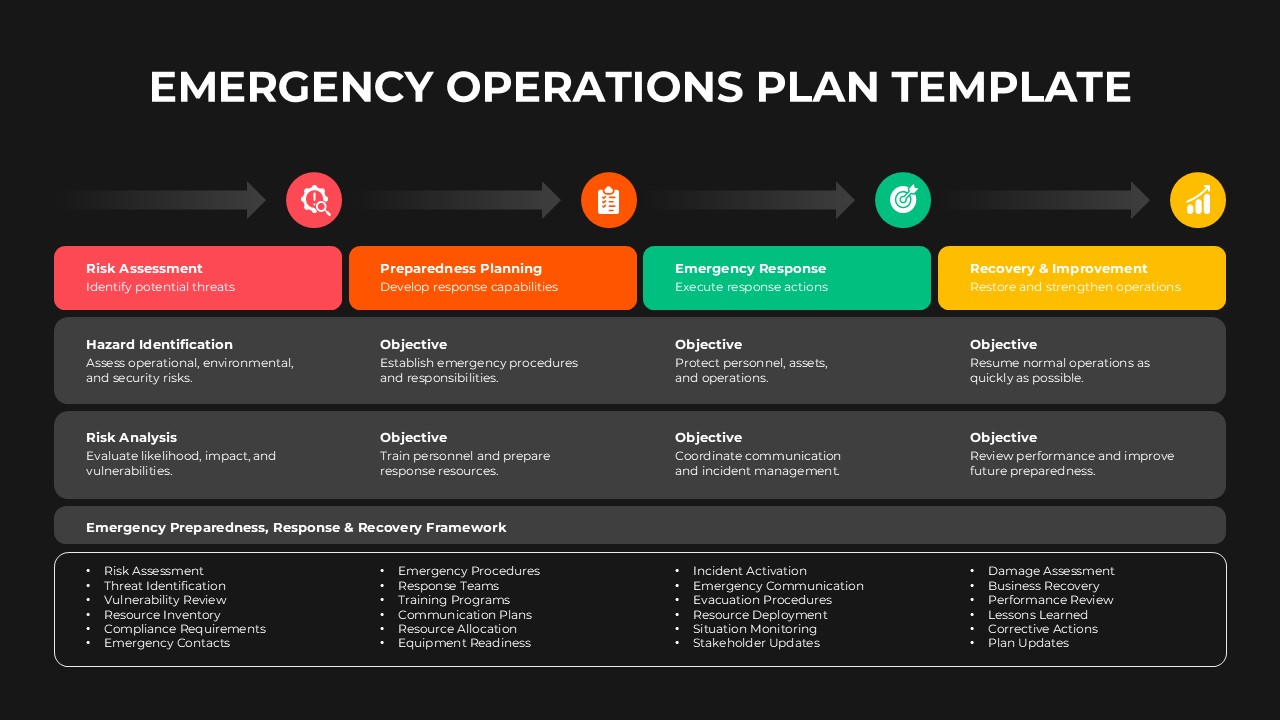
Use this Emergency Operations Plan PowerPoint Template to present emergency management strategies and organize response procedures in a clear, structured format. This infographic is useful for businesses, safety managers, emergency response teams, and project coordinators who need to prepare for unexpected situations. It helps explain the four key stages of emergency management: Risk Assessment, Preparedness Planning, Emergency Response, and Recovery & Improvement. Organizations can use this layout to identify potential hazards, establish response objectives, coordinate emergency activities, and plan recovery measures.
The slide features a four-stage horizontal process diagram connected by directional arrows and circular icons. Each stage has a dedicated color-coded heading with a short description of its purpose. Below the process, two information rows outline hazard identification, risk analysis, and objectives for each stage. The bottom section presents an Emergency Preparedness, Response & Recovery Framework in four columns, covering activities such as threat identification, emergency procedures, resource allocation, incident activation, damage assessment, and corrective actions. Its organized layout makes complex emergency planning information easier to understand.
This Emergency Operations Plan Template is editable in PowerPoint & Google Slides, allowing you to customize the text, icons, colors, and other visual elements to match your organization’s requirements. It is suitable for corporate safety presentations, workplace emergency planning, disaster management discussions, business continuity planning, and risk management reports. You can also browse our PowerPoint Templates for more presentation resources related to business operations, planning, and process improvement. Download this PowerPoint slide to communicate your emergency procedures and help teams understand their responsibilities during critical situations.
Frequently Asked Questions
What are the four main stages of an Emergency Operations Plan?
What can an Emergency Operations Plan PowerPoint Template be used for?
Login to download this file

Item ID
SB06029Designed By
Amal


Related Templates

ABCDE Approach Emergency Assessment Wheel Diagram for PowerPoint
Circular
Marketing Operations Venn Diagram Template for PowerPoint & Google Slides
Circular
IT Operations & Monitoring Template for PowerPoint & Google Slides
Information Technology
Principles of Operations Effectiveness Template for PPT & Google Slides
Leadership
Business Operations Management Learning Roadmap Diagram
Roadmap
Day To Day Operations
Process
Operations Management Timeline Infographics
Timeline
Free

Business Pricing Plan Template for PowerPoint Template
Finance
Company Startup Plan Timeline PowerPoint Template
Timeline
30 60 90 Day Plan Template PowerPoint and Google Slides
Business
4 Steps Business Plan Table Template for PowerPoint & Keynote
Business Plan
Communication Plan Outline PowerPoint Template
Infographics
30 60 90 Plan of Action PowerPoint Template
Timeline
Onboarding Plan PowerPoint Template
Recruitment
Mitigation Plan PowerPoint Template
Risk Management
Plan Do Review Process PowerPoint Template
Process
Training Plan Table PowerPoint Template
Employee Performance
HR Strategic Plan PowerPoint Template
Human Resources
Software Sales Marketing Plan Template for PowerPoint
Marketing
Contingency Plan PowerPoint Template
Risk Management