Brand Positioning PowerPoint Template
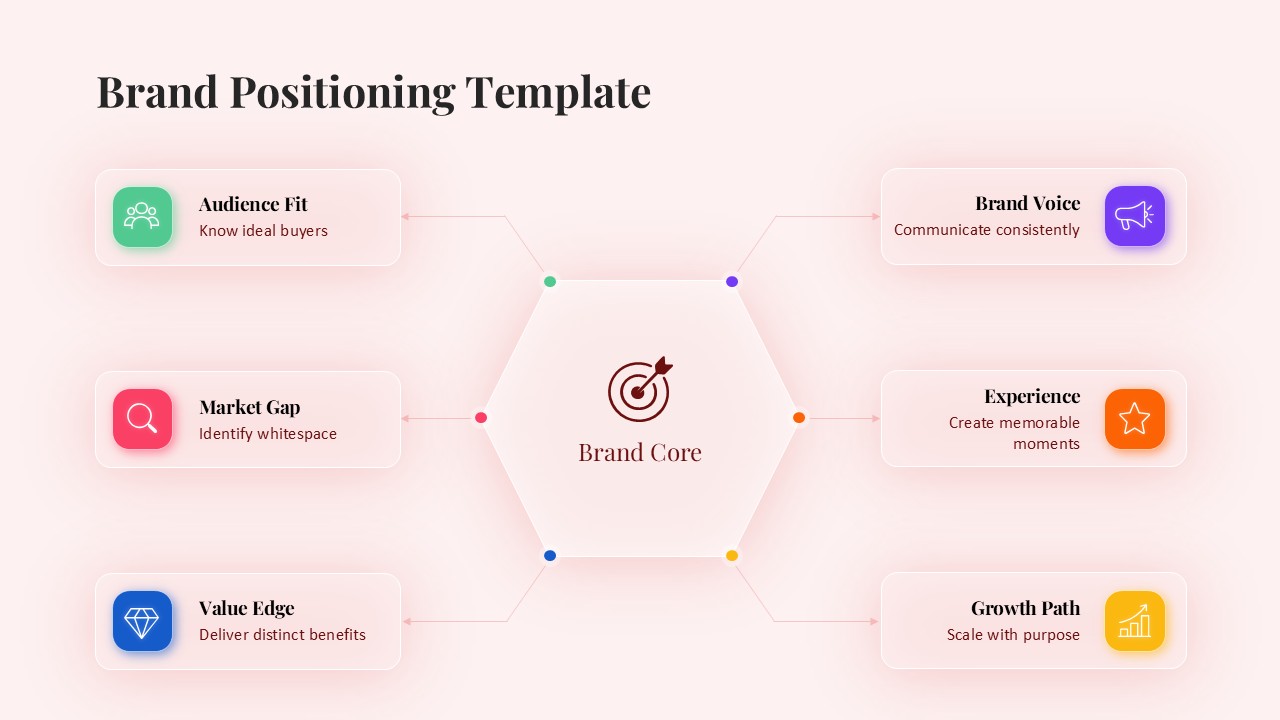
In a crowded market where every brand is competing for attention, businesses need a clear way to explain who they are, who they serve, and what makes them relevant. The Brand Positioning PowerPoint Template provides marketers, founders, and brand strategists with a structured visual framework for presenting that story. Built around a central hexagonal “Brand Core,” the layout connects six key positioning pillars: Audience Fit, Market Gap, Value Edge, Brand Voice, Experience, and Growth Path. Each pillar includes its own icon, color accent, and concise description, allowing stakeholders to understand the complete positioning framework without working through long blocks of text.
The slide combines a clear structure with plenty of visual breathing room. A soft blush background, serif headline typography, clean sans-serif body text, and spacious content cards create a balanced presentation layout. Editable placeholders make it easy to add audience insights, competitive gaps, brand voice principles, or growth milestones without rebuilding the slide. It can work as a standalone brand strategy visual or as part of a larger brand book, pitch deck, or marketing plan.
Marketing teams can use the slide during brand audits and repositioning sessions. Startup founders can present their differentiation strategy to investors, while agencies can use it to communicate positioning recommendations to clients and other stakeholders. Since the PowerPoint layout is fully editable, including colors, icons, text, and card count, it can be adapted for B2B, B2C, DTC, and service based brands.
Where This PPT Slide Fits in Your Presentation Workflow
Whether you are preparing a complete brand strategy deck, a quarterly marketing presentation, or a focused business pitch, this template provides a central visual reference for your positioning story. It helps keep the discussion focused around the key elements that define how your brand is positioned in the market.
Frequently Asked Questions
Can I customize the six positioning sections to match my brand framework?
Is this template suitable for client-facing presentations?
Login to download this file

Item ID
SB06170Designed By
Athira


Related Templates

Brand Positioning PowerPoint Template
Business
Supply Positioning Model PowerPoint Template
Comparison Chart
STP Segmentation Targeting Positioning Strategy Deck for PowerPoint & Google Slides
Marketing
Branding and Positioning Venn Diagram for PowerPoint
Comparison
Supply Positioning Model Template
Business Models
Keller’s Brand Equity PowerPoint Template
Business Strategy
Brand Essence Wheel PowerPoint Template
Marketing
Brand Identity Prism PowerPoint Template
Infographics
Brand Pyramid PowerPoint Template
Pyramid
Strategic Brand Equity Pyramid Diagram Template for PowerPoint & Google Slides
Pyramid
Brand Strategy Roadmap PowerPoint Template
Roadmap
Brand Portfolio Market Segments PowerPoint Template
Business Report
Brand Essence Wheel Strategy Diagram Template for PowerPoint & Google Slides
Circular
Pyramid Brand Strategy Framework Template for PowerPoint & Google Slides
Business Strategy
Brand Value Chain Model PowerPoint Template
Marketing
Brand Evaluation Process Template
Process
Brand Repositioning Strategy Quadrant Presentation Template
Business Strategy
Brand Comparison Chart Template for Product and Competitive Analysis
Comparison Chart