

















































search

Essentials

Must-have decks for quick wins

By Industry

Professionally tailored slides for every sector

By Style

Minimal, modern and creative designs

By Topic

Explore slides curated by purpose and theme

TimelineTimelineRoadmapRoadmapStrategyStrategyGoalsGoalsTableTableComparisonComparisonSWOTSWOTAgendaAgendaArrowArrowWorld MapWorld MapMapsMapsProcessProcessFunnelFunnelTeamTeamOrg ChartOrg ChartPyramidPyramidCircularCircular

Business PlanBusiness PlanBusiness StrategyBusiness StrategyBusiness ProposalBusiness ProposalBusiness ModelsBusiness ModelsDigital MarketingDigital MarketingMarketing FunnelMarketing FunnelCustomer ExperienceCustomer ExperienceProject StatusProject StatusGantt ChartGantt ChartRecruitmentRecruitmentEmployee PerformanceEmployee PerformanceLeadershipLeadershipAIAIMachine LearningMachine Learning

AI Presentation Maker

Install the Windows plugin for quick access to templates and design tools.

AI Infographics Maker

Use our Office 365 add - in to access templates directly from the cloud.

Exe Version

Install the Windows plugin for quick access to templates and design tools.

Office 365

Use our Office 365 add - in to access templates directly from the cloud.

Mac Version

Get the Mac plugin to easily browse, insert, and customize templates and visuals within PowerPoint.

Operating Channels Diagram Powerpoint Template
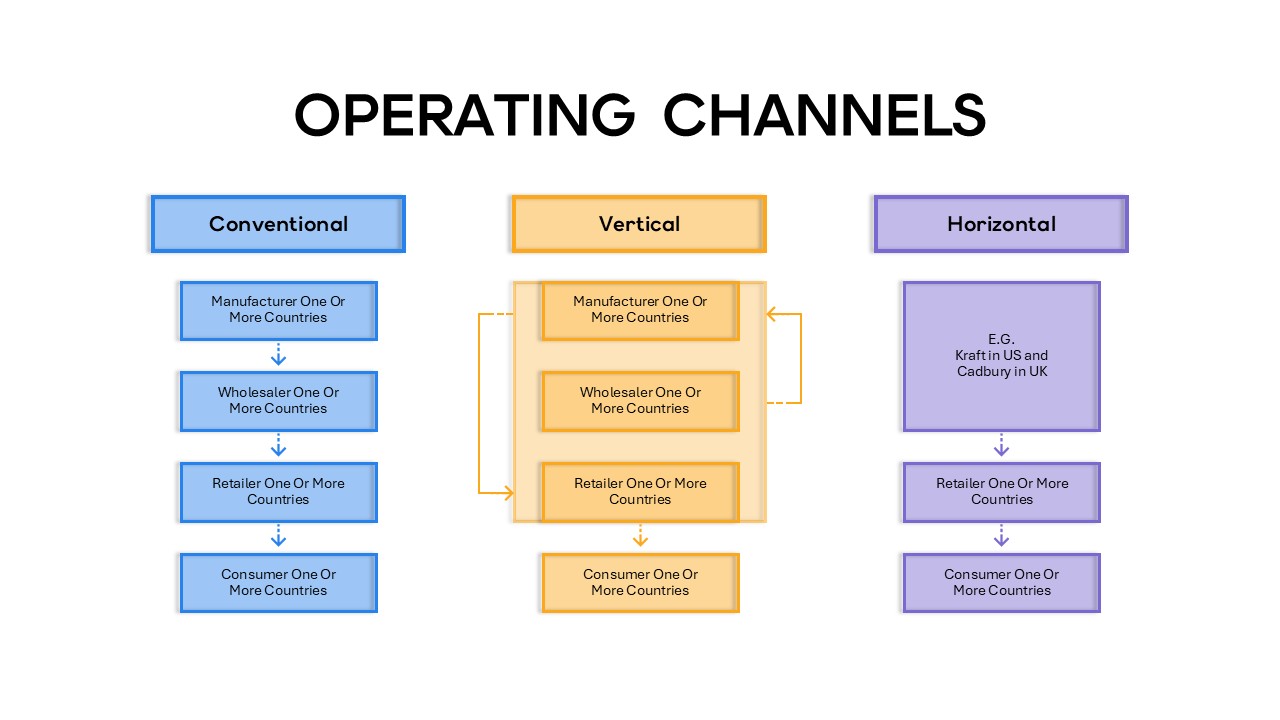
Operating Channels Diagram Powerpoint Template
This template is part of a deck featuring multiple slides. To check out all slides, click on See All. See All round right arrow

Description

Explain distribution and operating channel structures with clarity using this Operating Channels comparison diagram slide. The layout visually contrasts three common models—Conventional, Vertical, and Horizontal—through side-by-side vertical flows that guide audiences from manufacturer to consumer. Each column uses stacked process boxes connected by directional arrows, making it easy to illustrate control, integration, and collaboration differences across operating structures. Clear headings and balanced spacing help viewers instantly grasp how responsibilities and relationships shift between manufacturers, wholesalers, retailers, and end consumers in different channel strategies.

Designed for business communication, this slide combines a clean grid system with color-coded sections to support fast comprehension during presentations. The diagram structure simplifies complex supply chain and channel concepts, helping presenters explain market coverage, ownership levels, and partnership dynamics without overwhelming detail. Fully editable in PowerPoint and Google Slides, users can customize labels, colors, and flow directions to match specific industries, regions, or case studies. The professional visual hierarchy ensures the message remains focused, structured, and easy to follow in both internal and client-facing decks.

Who is it for

This template is ideal for business strategists, marketing managers, operations teams, and MBA students explaining distribution strategies or channel management concepts. Consultants and trainers can also use it to compare operating models during workshops or executive briefings.

Other Uses

Beyond operating channels, repurpose this slide for supply chain overviews, go-to-market strategy discussions, partner ecosystem explanations, or competitive business model comparisons. It also works well for teaching materials and strategic planning sessions.

Login to download this file
