

















































search

Essentials

Must-have decks for quick wins

By Industry

Professionally tailored slides for every sector

By Style

Minimal, modern and creative designs

By Topic

Explore slides curated by purpose and theme

TimelineTimelineRoadmapRoadmapStrategyStrategyGoalsGoalsTableTableComparisonComparisonSWOTSWOTAgendaAgendaArrowArrowWorld MapWorld MapMapsMapsProcessProcessFunnelFunnelTeamTeamOrg ChartOrg ChartPyramidPyramidCircularCircular

Business PlanBusiness PlanBusiness StrategyBusiness StrategyBusiness ProposalBusiness ProposalBusiness ModelsBusiness ModelsDigital MarketingDigital MarketingMarketing FunnelMarketing FunnelCustomer ExperienceCustomer ExperienceProject StatusProject StatusGantt ChartGantt ChartRecruitmentRecruitmentEmployee PerformanceEmployee PerformanceLeadershipLeadershipAIAIMachine LearningMachine Learning

AI Presentation Maker

Install the Windows plugin for quick access to templates and design tools.

AI Infographics Maker

Use our Office 365 add - in to access templates directly from the cloud.

Exe Version

Install the Windows plugin for quick access to templates and design tools.

Office 365

Use our Office 365 add - in to access templates directly from the cloud.

Mac Version

Get the Mac plugin to easily browse, insert, and customize templates and visuals within PowerPoint.

machine-learning-model-training-diagram-PPT-slide
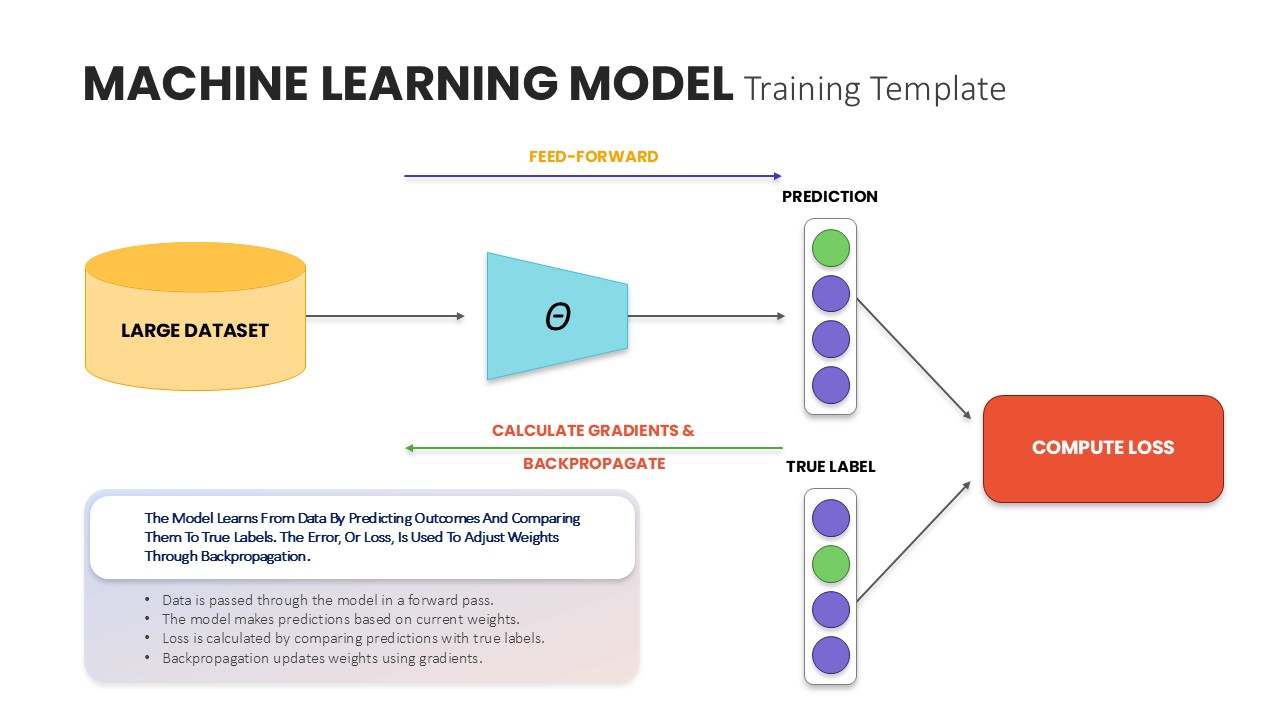
Machine learning model training diagram showing dataset input, prediction, loss calculation, and backpropagation flow.
This template is part of a deck featuring multiple slides. To check out all slides, click on See All. See All round right arrow

Description

This machine learning model training diagram slide visually explains the end-to-end learning workflow in a clear and structured format. The layout illustrates how a large dataset flows through a model, generates predictions, compares them with true labels, computes loss, and applies backpropagation to optimize model parameters. Directional arrows and labeled stages such as feed-forward, gradient calculation, and loss computation help viewers easily follow the training cycle step by step. Clean shapes, intuitive icons, and balanced spacing ensure the technical process remains accessible without oversimplifying core concepts.

The slide is fully editable, allowing users to customize labels, colors, icons, and annotations to match specific algorithms or use cases. Its visual hierarchy supports logical storytelling, making complex machine learning concepts easier to communicate to both technical and non-technical audiences. Designed for seamless use in PowerPoint and Google Slides, the diagram retains clarity and alignment across platforms, making it reliable for live presentations and shared documentation.

Who is it for

This slide is ideal for data scientists, machine learning engineers, AI researchers, educators, and technology consultants. It is also well suited for startup teams, product managers, and business stakeholders who need a high-level understanding of how machine learning models are trained.

Other Uses

Beyond model training explanations, this slide can be adapted for AI workflow overviews, algorithm walkthroughs, educational lectures, onboarding sessions, or technical proposals. It also works well in research presentations, internal training decks, investor briefings, and software documentation where explaining learning pipelines is essential.

Login to download this file
