


















































search

Essentials

Must-have decks for quick wins

By Industry

Professionally tailored slides for every sector

By Style

Minimal, modern and creative designs

By Topic

Explore slides curated by purpose and theme

TimelineTimelineRoadmapRoadmapStrategyStrategyGoalsGoalsTableTableComparisonComparisonSWOTSWOTAgendaAgendaArrowArrowWorld MapWorld MapMapsMapsProcessProcessFunnelFunnelTeamTeamOrg ChartOrg ChartPyramidPyramidCircularCircular

Business PlanBusiness PlanBusiness StrategyBusiness StrategyBusiness ProposalBusiness ProposalBusiness ModelsBusiness ModelsDigital MarketingDigital MarketingMarketing FunnelMarketing FunnelCustomer ExperienceCustomer ExperienceProject StatusProject StatusGantt ChartGantt ChartRecruitmentRecruitmentEmployee PerformanceEmployee PerformanceLeadershipLeadershipAIAIMachine LearningMachine Learning

AI Presentation Maker

Install the Windows plugin for quick access to templates and design tools.

AI Infographics Maker

Use our Office 365 add - in to access templates directly from the cloud.

Exe Version

Install the Windows plugin for quick access to templates and design tools.

Office 365

Use our Office 365 add - in to access templates directly from the cloud.

Mac Version

Get the Mac plugin to easily browse, insert, and customize templates and visuals within PowerPoint.

Adding Illustrations using the SlideBazaar plugin

Introduction 

This is a guide on adding illustrations using SlideBazaar plugin into your presentation slides. The add-in gives you access to a PowerPoint illustrations library that you can use to download illustrations onto your slides and use them in your presentations. 

Getting started 

To get started with adding illustrations using SlideBazaar plugin, click on Illustrations in the ribbon or the Illustrations button in the Format Tools sidebar.  
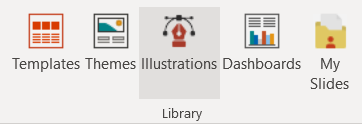
illustration

This launches a dialog box where you can search for, filter, and find illustrations for your presentations. 

To add illustrations to your slides, hover your mouse over the illustration and click on it. You can even click on the lens button to get a larger view of the illustration, and you can click on the heart button to add it to your favorites. 

Conclusion 

SlideBazaar’s add-in gives you access to a PowerPoint illustrations library, from which you can find the right illustrations and add them to your slides with just a click. If you run into any issues, feel free to contact us here.